
Configurable Behavior System
A sophisticated, highly configurable Behavior System with individual account profiles. Tune behavior preferences and break settings to suit the way you want each account to run, with controls available in the client.
A plugin for your RuneLite
GenericClient runs as a plugin inside the standard RuneLite client. Keep your familiar interface, settings, and plugins, with automation a click away.
Right where you play
Install GenericClient into your existing RuneLite setup and open its menu from the toolbar. Your game stays in RuneLite; the GenericClient dashboard puts scripts, schedules, and account controls within reach.
Get the plugin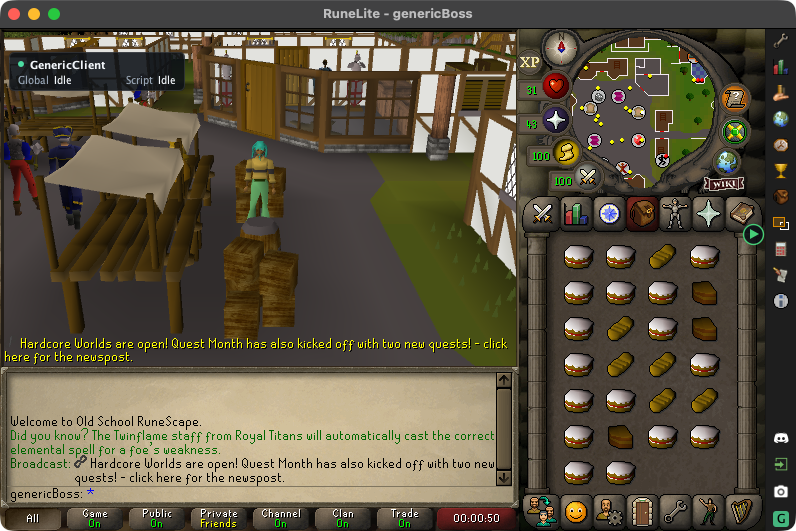
The tools behind your sessions
A sophisticated, highly configurable Behavior System with individual account profiles. Tune behavior preferences and break settings to suit the way you want each account to run, with controls available in the client.
Search by name or author, filter categories, and browse script covers. View details and configure a script before you run it.
Browse all scriptsManage connected clients from your account on the website. View status and screenshots, configure and start scripts, stop runs, and control login and schedules.
Set time windows and rules for each account. Review schedule decisions and enable or pause scheduled runs from the dashboard.
Import and manage saved characters, switch accounts, and keep game credentials in encrypted local storage on your device.
Take over with your mouse or stop automation with Escape. Safety and recovery tools help handle interruptions, with clear status and script output in the client.
The Random Event Handler script brings supported events into one entry, working with the client's interruption and resume controls.
Use your GenericClient account across Windows, macOS, and Linux, with unlimited concurrent clients and one place to manage access.
Bring existing Java script source to RuneLite with support for the DreamBot public API. Recompile scripts that use the supported API against the GenericClient SDK, then install them in your library.
Make the run your own
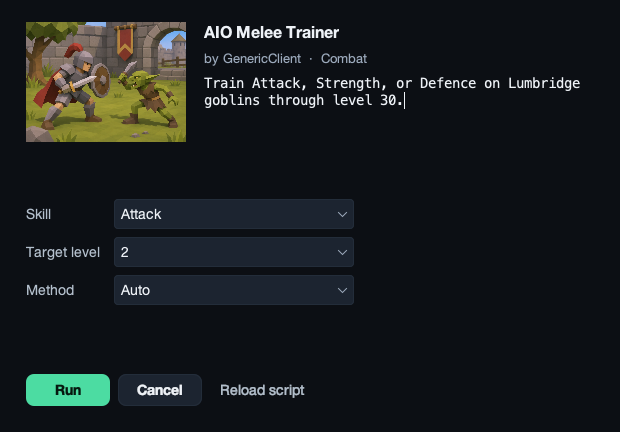
Each script exposes its own options, from target levels to supported methods and quest choices. Review your settings, then start when you're ready.
Find your next scriptCreate an account, choose a plan, and install the plugin.